
November 9, 2026
System Design: How I'd Build a Rate Limiter
If you've ever built something on top of another company's API, you've hit a rate limit. When we connected Shopify to the e-commerce console we built for a client, a surprising amount of the work was simply staying inside Shopify's limits. So I wanted to look at it from the other side. If I were the one running the API, how would I design the thing that says "slow down"?
It's also one of the most common system design interview questions, and for good reason. It looks small, but it touches algorithms, distributed state, failure handling, and API design all at once. Here's how I'd work through it.
What a rate limiter is for
A rate limiter caps how many requests someone can make in a given amount of time. Something like 100 requests per minute per user, or 5 login attempts per minute per IP address. Once you go over, your requests get rejected until the window resets.
There are a few good reasons to have one. It stops a single client, whether that's a bug in someone's script or an actual attacker, from taking down the service for everyone. It keeps costs predictable, which matters a lot if each request triggers something expensive like an AI call or a payment check. It makes things fair, so one heavy user doesn't eat all the capacity. And it slows down brute force attacks on things like login forms.
Pinning down the requirements
Before drawing anything, I like to agree on what the system actually needs to do.
On the functional side, it should limit requests by some key, like a user ID, an API key, or an IP address. Different routes and different plans should be able to have different limits. When a request gets rejected, the client should get a clear answer: an HTTP 429 Too Many Requests, plus headers telling them how long to wait.
On the non-functional side, the main one is speed. The rate limiter sits in front of every single request, so it can't add much latency. A couple of milliseconds is fine, fifty is not. It also has to work across many servers, since the limit is per user, not per server. And it needs a plan for when it breaks, because it will.
One more thing worth saying out loud: it doesn't need to be perfectly exact. If a user gets 101 requests through instead of 100 once in a while, nobody gets hurt. Accepting that up front opens up simpler and faster designs.
Where it lives
You could put rate limiting in the client, but you can't trust it. Anyone can skip the check by calling your API directly. So the real limit has to live on the server side.
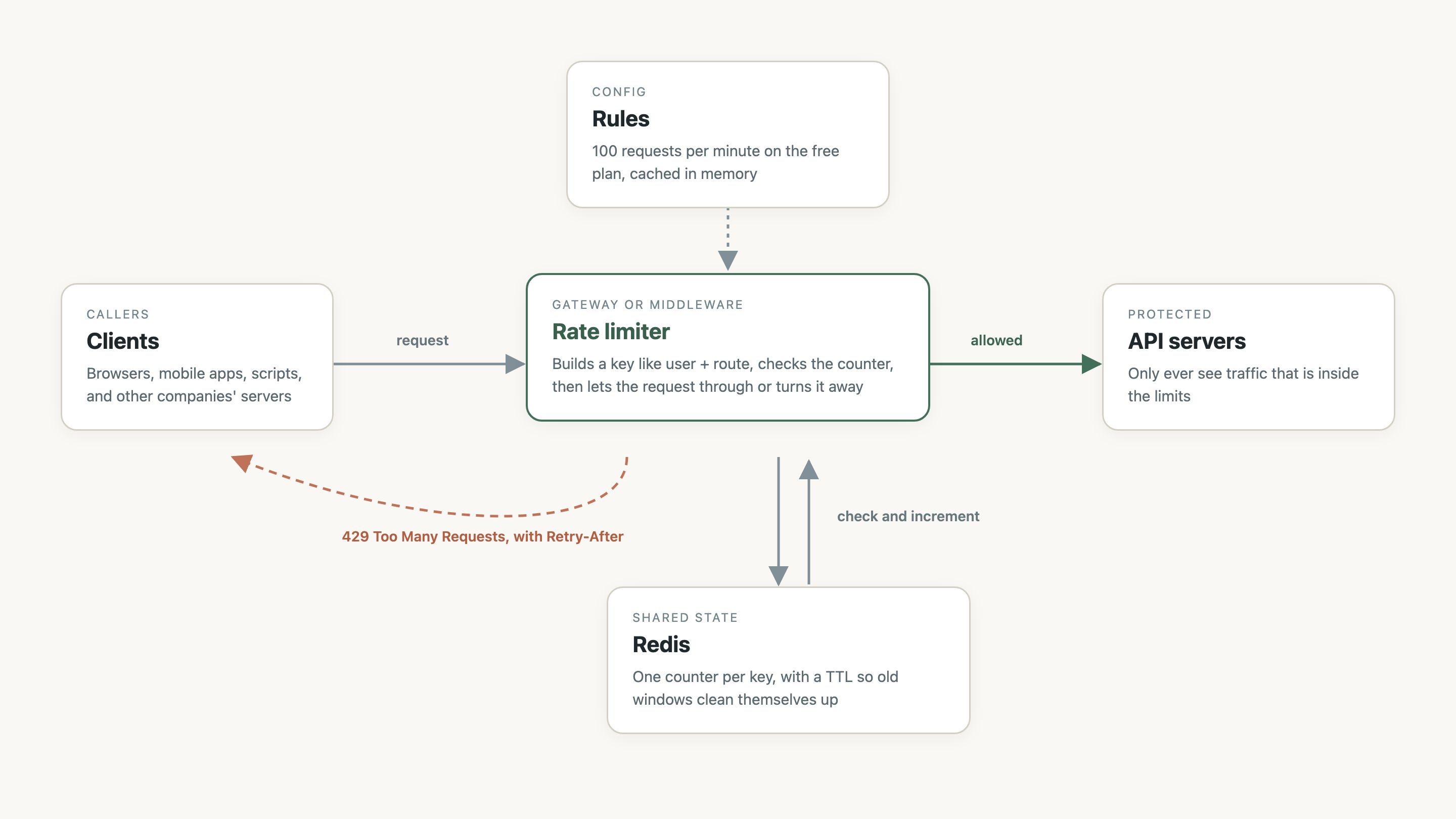
That leaves two common spots. You can put it in the API gateway or load balancer that sits in front of everything, which is where most managed platforms offer it. Or you can write it as middleware inside your own app, which gives you more control, like limiting based on things only your app knows, such as the customer's plan. Either way, the shape is the same.
The algorithms
This is the part interviewers usually care about most. There are five classic approaches, and each one trades accuracy, memory, and how it handles bursts a little differently.
Fixed window counter
Split time into fixed windows, like each calendar minute, and keep a counter per user per window. Each request adds one. If the counter is over the limit, reject.
It's dead simple and uses almost no memory. The catch is the edges of the window. With a limit of 100 per minute, a user can send 100 requests at 12:00:59 and another 100 at 12:01:00. That's 200 requests in two seconds, and both windows think everything is fine.
Sliding window log
Store a timestamp for every request. When a new one comes in, throw away timestamps older than one minute, count what's left, and decide.
This one is perfectly accurate, with no edge problem. But you're storing every single request, so memory grows with traffic. For a busy API, that adds up fast.
Sliding window counter
This is a clever middle ground. Keep the counters for the current window and the previous one, and estimate the last 60 seconds by weighting them. If we're 15 seconds into the current minute, take 75% of last minute's count plus all of this minute's count so far.
It assumes the previous window's requests were spread out evenly, so it's an approximation. In practice it's very close, and it only needs two numbers per user. This is the one I'd usually reach for.
Token bucket
Picture a bucket that holds up to 10 tokens and gets refilled at 2 tokens per second. Each request takes a token. If the bucket is empty, the request is rejected.
The nice thing here is that it allows short bursts. A user who has been quiet can fire off 10 requests at once, but over time they can't average more than 2 per second. That matches how real clients behave, since apps tend to load a few things at once and then go quiet. It's also really easy to implement. Here's a version for a single server in Go:
type Bucket struct {
	mu       sync.Mutex
	capacity float64
	tokens   float64
	rate     float64 // tokens added per second
	last     time.Time
}

func NewBucket(capacity, rate float64) *Bucket {
	return &Bucket{capacity: capacity, tokens: capacity, rate: rate, last: time.Now()}
}

func (b *Bucket) Allow() bool {
	b.mu.Lock()
	defer b.mu.Unlock()

	// Refill based on how much time has passed, capped at capacity.
	now := time.Now()
	b.tokens = math.Min(b.capacity, b.tokens+now.Sub(b.last).Seconds()*b.rate)
	b.last = now

	if b.tokens < 1 {
		return false
	}
	b.tokens--
	return true
}
Notice there's no background timer adding tokens. We just work out how many tokens should have been added since the last request. That trick shows up a lot in rate limiting, and it's what keeps it cheap.
Leaky bucket
Requests go into a queue, and the queue is processed at a fixed rate, like water leaking out of a hole at the bottom of a bucket. If the queue is full, new requests get dropped.
The result is perfectly smooth output, which is great when the thing you're protecting really can't handle bursts. The downside is that requests wait in line instead of getting an instant yes or no. As far as I know, Shopify describes the limits on its REST Admin API as a leaky bucket, which is part of why our n8n workflow had to pace itself.
Going from one server to many
The Go example works fine on one server. But real APIs run on many servers behind a load balancer, and a user's requests get spread across all of them. If each server keeps its own counts, a user with a limit of 100 could get 100 per server. The counts need to live somewhere shared.
The usual answer is Redis. It's in memory, so it's fast, and it has atomic operations built in. Each user and route gets a key, something like "rl:user_42:/orders", and the rate limiter checks and updates that key on every request.
There's a subtle trap here, though. If you read the counter, check it, and then write it back as separate steps, two requests can read the same value at the same moment and both get through. With enough traffic, that happens all the time. The fix is to do the whole check in one atomic step. Redis lets you run a small Lua script that executes without anything else running in between. Here's a fixed window version:
-- KEYS[1] = the rate limit key, ARGV[1] = window length in seconds
local current = redis.call("INCR", KEYS[1])
if current == 1 then
  redis.call("EXPIRE", KEYS[1], ARGV[1])
end
return current
INCR is atomic on its own, but putting the EXPIRE in the same script matters too. Otherwise, if the server crashed right between the two calls, you'd end up with a key that never expires and a user who's locked out forever.
Memory is less scary than it sounds. Say you have a million active users, and each key with its counter takes around 100 bytes. That's about 100 MB, which fits comfortably on a single Redis instance. The TTL means inactive users clean themselves up.
Telling the client what happened
A good rate limiter is polite about saying no. Return a 429 status, and include a Retry-After header so the client knows exactly how long to wait. A lot of APIs also send headers on every response, often named X-RateLimit-Limit, X-RateLimit-Remaining, and X-RateLimit-Reset, so well-behaved clients can slow themselves down before they hit the wall.
On the client side, the right response to a 429 is to back off and retry, waiting a bit longer each time, with some randomness mixed in. That randomness, usually called jitter, matters more than it sounds. Without it, every client that got rejected at the same moment retries at the same moment too, and you get the same spike all over again.
What happens when things break
This is the part people tend to skip, and it's where the interesting decisions are.
If Redis goes down, do you let every request through or block them all? Failing open keeps your service up but drops the protection. Failing closed keeps the protection but turns a Redis outage into a full outage. For most APIs, I'd fail open and alert loudly, because the rate limiter exists to protect the service, not to become the reason it's down. A login endpoint might be the exception, since that's where the limit is doing security work.
Latency matters too. Every request now makes a trip to Redis, so it should sit close to your app servers, with tight timeouts so a slow Redis doesn't slow down everything else.
And if you run in several regions, you have to decide whether limits are global or per region. Truly global counts mean talking across regions on every request, which is slow. Most of the time, splitting the limit per region, or syncing counts in the background and accepting being a little off, is the better trade. This is where that "it doesn't have to be exact" requirement from the start pays off.
Wrapping up
If I had to sum it up: put it on the server side, pick sliding window counter or token bucket depending on whether you want to allow bursts, keep the counts in Redis and update them atomically, answer with a 429 and a Retry-After, and decide ahead of time what happens when Redis isn't there.
What I like about this problem is that every piece is simple on its own. The real design work is in the tradeoffs: exact versus cheap, strict versus available, global versus fast. Being able to explain why you picked one side of each is most of what makes the answer good, in an interview or in production.